File > Settings: Language & Colour |
Top Previous Next |

Changing Language & Color Settings in Smart-IT
Go to: File > Settings: Language & Colour.
Use this form to change the language and colour scheme of the Smart-IT interface or specify which server a workstation should connect to.
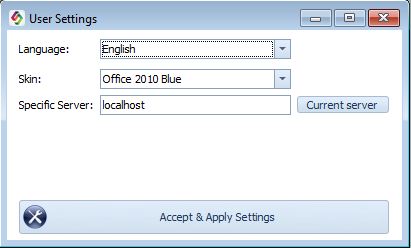
Language Options
Smart-IT supports the following interface languages:
•English
•German
•Dutch
•Greek
•Japanese
•Afrikaans
Select the required language to change the language displayed in the Smart-IT interface.
Important: Changing the interface language does not automatically change the language used on customer documents.
To print invoices, statements, or other documents in a customer's preferred language, go to: Customer > Financial Info > Language.
Colour Scheme
The Colour Scheme setting changes the background appearance of the Smart-IT interface.
Select your preferred colour scheme to personalise the application's appearance.
This setting changes the interface colours, not the colours printed on invoices or other reports.
Specific Server
The Specific Server setting allows you to specify the IP address of the server to which a workstation should connect.
This setting is generally only required when a network has multiple servers and a workstation should only connect to a specific server.
How to Connect a Workstation to a Specific Server
Step 1: Go to the workstation that must connect to the correct server.
Step 2: Obtain the IP address of the server you want the workstation to connect to.
Step 3: Enter the IP address or click Current Server to use the currently logged into server
Step 4: Click Accept & Apply Settings to apply the changes.
Note: You will need a daypass from Smart-It to unlock this function.
Important: Ensure that you enter the correct server IP address. If you are unsure which server to use, ask your network administrator or IT support provider.
