Invoice Extra: Stock Collection Lookup |
Top Previous Next |
Hover the mouse over the different fields on the form. If the cursor changes to a hand ( ) , click to get more information.

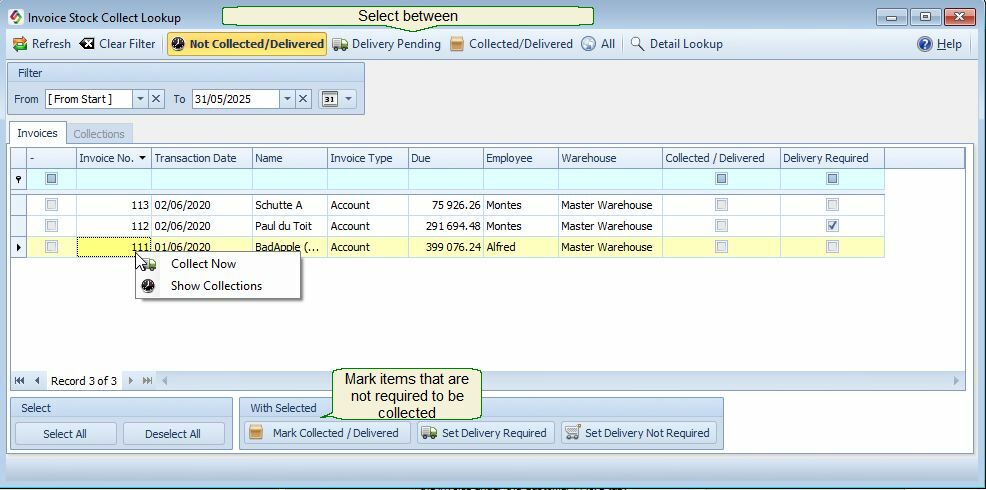
Invoice Stock Collection Lookup
Go to: Invoice > Extra > Invoice Stock Collection Lookup
Overview
The Invoice Stock Collection Lookup provides an overview of stock sold on invoices that is still awaiting collection or has already been collected.
The lookup allows you to:
•See which invoice items have been collected.
•See which invoice items are still awaiting collection.
•Mark items as collected when physical collection is not required.
•Indicate whether items require delivery.
•Record delivery required.
•View previous collection transactions and receipts.
Actions Available
Mark Collected
Use Mark Collected when the stock does not need to go through the normal collection process.
1. Select the applicable invoice or items.
2. Click Mark Collected.
3. The selected items are marked as Collected.
Example: Use this when the stock has already been handed to the customer, or when no physical collection process is required.
Set Delivery Required
Use Set Delivery Required when the items still need to be delivered to the customer.
Select the applicable invoice or items and click Set Delivery Required.
The items will be identified as requiring delivery.
Set Delivery Not Required
Use Set Delivery Not Required when the items do not need to be delivered.
Select the applicable invoice or items and click Set Delivery Not Required.
This removes the items from the outstanding delivery requirements.
Right-Click Options
Right-click an invoice number to access additional options.
Collect Now
Use Collect Now when the customer is collecting stock now.
1. Right-click the invoice number.
2. Select Collect Now.
3. Enter the quantities the customer is collecting.
4. Complete the collection process.
This records the actual quantities collected against the invoice.
Show Collections
Select Show Collections to view the collection history for the invoice.
The collection history shows previously processed collections and provides access to the related Stock Collection Receipts.
This allows you to see what has already been collected and review or reprint the associated receipt where required.