AI Prompt - Long Description |
Top Previous Next |
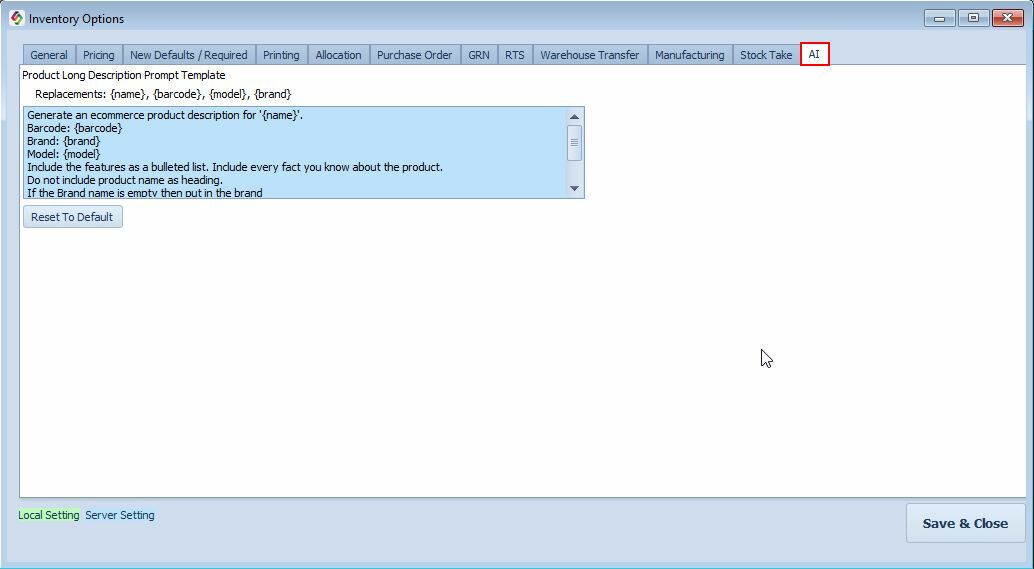
Product Long Description AI Prompt
Go to: Stock Items > Stock Options > the AI Tab
The Product Long Description AI Prompt defines the instructions that Smart-IT AI uses to automatically generate a detailed Long Description for a stock item.
The generated Long Description can be used when the product is uploaded to your web shop, helping to create consistent, informative, and customer-friendly product descriptions.
Generate a Long Description:
Open the Main Stock form and select the Picture and Memo tab. Click the AI Generate Long Description button.
To generate a Long Description:
•1. Open the Main Stock Form.
•2. Select the Picture and Memo tab.
•3. Click AI Generate Long Description.
•4. Smart-IT AI uses the Product Long Description AI Prompt, together with the available product information, to generate the Long Description.
The generated description can then be reviewed and edited before being used on your web shop.